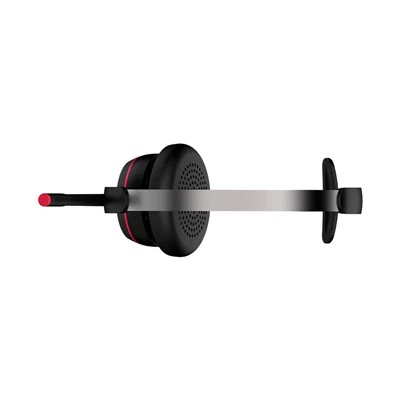
Hey everyone! I'm a supplier of Single Ear Headset with Microphone, and I know how important it is to get that perfect fit. A well - fitting single ear headset with a microphone not only enhances your comfort but also improves the audio quality, whether you're using it for work, gaming, or just chatting on the phone. In this blog, I'll share some tips on how to adjust the fit of a single ear headset with a microphone.
Understanding Your Headset
First things first, you need to understand the different parts of your Single Ear Headset with Microphone. Most single ear headsets have an earpiece, a microphone boom, and some form of adjustment mechanism. The earpiece is the part that sits in or on your ear, the microphone boom is the arm that holds the microphone close to your mouth, and the adjustment mechanism can be a flexible band, a slider, or something else.
Adjusting the Earpiece
The fit of the earpiece is crucial. If it's too loose, it might fall out easily, and if it's too tight, it can be uncomfortable after a long time.
For In - Ear Headsets
If you have an in - ear single ear headset, start by choosing the right size of ear tips. Most headsets come with multiple sizes of ear tips in the box. Try each size to see which one fits your ear canal the best. Insert the ear tip into your ear canal and gently twist it. You should feel a snug fit, but not so tight that it causes pain. If you're still having trouble getting a good fit, you can try different types of ear tips, like foam tips, which can conform better to the shape of your ear canal.
For On - Ear Headsets
On - ear headsets rest on the outside of your ear. Adjust the headband or the earpiece itself to ensure it sits comfortably on your ear. Some headsets have a flexible headband that you can bend to fit the shape of your head. Make sure the earpiece covers your entire ear, and there are no gaps around the edges. If the headset is too tight, it can cause headache and discomfort. You can try stretching the headband slightly to make it more comfortable.
Adjusting the Microphone Boom
The microphone boom needs to be in the right position to pick up your voice clearly.


Positioning
The microphone should be close to your mouth, but not touching it. A good rule of thumb is to position the microphone about 1 - 2 inches away from the corner of your mouth. You can adjust the length and angle of the microphone boom. Most headsets allow you to bend the boom to the desired position. If the microphone is too far away, your voice might sound faint or unclear on the other end. If it's too close, it can pick up unwanted noises like breathing.
Testing
After adjusting the microphone, it's a good idea to test it. You can make a quick call or record a short voice note. Listen to the recording and check if your voice sounds clear and natural. If you hear any background noise or your voice sounds muffled, adjust the position of the microphone again.
Other Adjustment Tips
Band Adjustment
If your headset has a band that goes around your head or behind your neck, make sure it's adjusted properly. A band that is too tight can be uncomfortable, while a band that is too loose can cause the headset to slip. Adjust the band so that it holds the headset in place without being too restrictive.
Weight Distribution
Some headsets can feel heavy if they're not properly balanced. Check if the weight of the headset is evenly distributed. If one side feels heavier than the other, it can cause discomfort. You can try adjusting the position of the headset or the band to balance the weight.
Troubleshooting Common Fit Issues
Headset Keeps Falling Out
If your headset keeps falling out, it could be because the earpiece is not the right size or the fit is too loose. Try changing the ear tips if it's an in - ear headset. For on - ear headsets, adjust the headband to make it tighter. You can also try using an ear hook or a stabilizer if your headset comes with one.
Discomfort
If you're experiencing discomfort, it could be due to a tight fit or a poor design. First, check if the headset is adjusted correctly. If it's still uncomfortable, you might need to look for a different type of headset. Some people find that certain materials, like leather or foam, are more comfortable than others.
Conclusion
Getting the right fit for your single ear headset with a microphone is essential for a great audio experience. By following these tips, you can adjust your headset to fit your ears and head perfectly. Remember, a well - fitting headset not only makes you more comfortable but also improves the quality of your communication.
If you're in the market for a high - quality Single Ear Headset with Microphone, we're here to help. We offer a wide range of headsets with different features and designs to meet your needs. Whether you're a professional who needs a reliable headset for work or a gamer looking for an immersive audio experience, we've got you covered. If you're interested in purchasing our products or have any questions, feel free to reach out to us for a procurement discussion. We're looking forward to working with you!
References
- Personal experience as a Single Ear Headset with Microphone supplier.
- Industry knowledge on headset design and fit.